Showing posts with label Spring. Show all posts

Thursday, May 8, 2014

Exploring Cricut and More Thursday Project

Hello! I am sharing today at Exploring Cricut and More. In keeping with the challenge I created a project for Mother's Day including a ribbon in my floral arrangement.


I created 7 flowers with the Flower Shoppe cartridge.There are quite a few videos on youtube.com showing various methods of making paper flowers. I really like this one and used it as my inspiration. She has other videos on different flowers as well that are awesome! I chose to not have them so tightly cupped for a different look.


The wire was hot glued between the folds of the layers and then the button was hot glued to the center. 


The butterfly has a vellum overlay that is hot glued in the center. It also has a wire attached with hot glue to the back.


I inked the flowers prior to using the stylus, as shown in the video, to cup the flowers. I stickled the edges of most of the petals once the flower was put together.

Recipe:
Cricut Expression
Flowers - Flower Shoppe (Fun2)
Butterfly - Everyday Pop Up Cards
Fruit Punch Stickles, Floral wire, Buttons, Ribbon

Thanks for stopping by!

Annette


Saturday, April 19, 2014

Exploring Cricut and More - "It's A Spring Thing"

Happy Monday! It's challenge time at Exploring Cricut and More. Make a card, layout or craft celebrating Spring and include at least 1 flower. 

I decided to create a card. I used my Cricut to cut the images I chose. The birds had legs on them but I cut them off because I wanted the birds to be resting on the branch and flowers. 


I chose to stickle the flowers so they would show up better on the white embossed scallop circle. The scalloped circle was given some texture by running it through the Cuttlebug machine. I used a brown marker to make the eyes for the birds.

Recipe:
A2 cardbase
Scalloped Circle - Elegant Edges 3.71"
Branch with Flowers - Gypsy Wanderings 1", 0.86"
Birds - 3 Birds- Straight From the Nest 1"
Cuttlebug Birds and Swirls
Orange, Yellow, Blue Stickles, brown marker

Thanks for stopping by and hope you join in the challenge this week!

Annette

Thursday, March 27, 2014

Exploring Cricut - Spring!

Hello! I'm glad you stopped by today as it is my turn to share at  Exploring Cricut and More. We just got done with Spring Break and I always feel like once that comes and goes I'm ready for summer. But, we still have a few more weeks of school left and it is definitely not warm enough around here. So, to keep me thinking warm thoughts, I decided to create a spring inspired card.


The wreath could be cut as is or you could cut with your own colored papers. I decided to do both for this card. I enlarged the colored flowers to fit the size I needed and then print and cut them. For the wreath itself, I used papers that I had in my stash. To do this I traced each piece and then cut out with my Cameo.  I added Stickles to the flowers and wreath.  There was also a base to the wreath that I did not to use. 

The tag with sentiment was an SVG of Vintage labels and I apologize but I can't remember where I got them. I did see at the Silhouette store that there are some cute ones from Jillibean Soup that look very similar.  I changed the verbage on the tag by ungrouping the image. Once that's done I could add any sentiment I chose. It is nice to do this, especially if you don't have a stamp in your collection with just the right words to use:)

Recipe:
A2 cardbase Stampin' Up
Pattern Paper - My Mind's Eye
Wreath - Silhouette Store #56497
Twine, Fruit Punch, Yellow, Diamond Stickles, Black Ink

Thanks for stopping by and you still have time to enter our challenge until Saturday!

Annette

Thursday, March 13, 2014

Exploring Cricut - Spring Anyone?

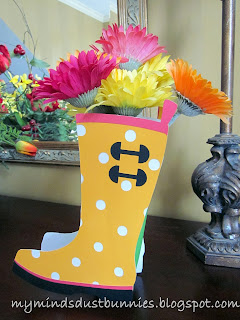
Hello Everyone! The warm air is teasing us these days and it needs to stay put.  I definitely am ready for the Spring/Summer season. It's my turn to share at Exploring Cricut and More and I was looking for a project that would help me think warm thoughts. I came across this cute vase at Lettering Delights. It happened to be a free cut, which always is a plus in my book.


You can cut this using your printer (using the color chosen already) or change the colors to your liking.  I chose to change the colors a little bit and here's how I did mine. 


I clicked on the Trace button (you can also find this under Object button and scroll down to Trace). I then clicked the Select Trace Area. I outlined the area that you see below. Once this was done I hit the Trace button.


The boot outline will then change to a red color instead of yellow and you can take your cursor and separate the yellow boot from the red outline. This outline is what you will use to cut with the color of your choice.

I then proceeded to do this with all of the cuts. You will also need to remember to cut two boots for both sides. To save on paper waste, when cutting the black and pink, I moved the outlines closer together before cutting. 

I put silk flowers in mine, but if you add some support to the bottom of your box a small bud vase will fit very nicely instead. This would make a sweet gift for any occasion.

Recipe:
12 x 12 American Craft Papers
Wellie Box - Lettering Delights
Silk Flowers

Hope you enjoyed my project and thanks for stopping by!

Annette

Thursday, December 5, 2013

Exploring Cricut - Thursday Project

Hello! Well, the week is almost over and it is my turn to share a project with you at Exploring Cricut. This is another CAS if you are looking for a fun gift for someone. Turtles are a favorite for the recipient of this gift, but the possibilities are endless.


I purchased the frame at Michael's with a coupon of course:) I used left over scraps, which is always a plus in my book. I chose to not add googly eyes to the turtle because the fit of the glass made it too tight.  Stickles looked to harsh for me. I might suggest if you decide to create this to leave the glass off if you really want something on the eye or get a frame that has more space between. 


I measured the inside of each frame and used my gypsy to create a rectangle of the same size. You can also do this in CCR. Remember to take your link off so that you can change height and width. I then was able to size my turtle exactly to fit inside of the frame.
I backed the turtles with white paper and think it really makes the colors pop. Sorry for the picture not being as bright. Cloudy weather here does not make for great pics.


Recipe:
Turtle - Walk In My Garden 
Papers - Scraps
Frame - Michael's

Thanks for stopping by and remember you still have time to create a Christmas card to enter our challenge!!

Annette


Monday, April 8, 2013

Exploring Cricut - Spring Time

Hello! It is finally spring in my neck of the woods and what a great time for Exploring Cricut to have this new challenge. You are to create a spring theme card, project or layout using 1 button, 2 Cricut cuts, and 3 colors of pattern paper or cardstock.

I decided to create a spring theme card with, of course, Create A Critter. The characters are so cute on this cartridge. I enjoyed creating this card and hope you enjoy looking at it.


Recipe:
A2 card base
Papers - Scraps
Duck - Create A Critter
Face - Peachy Keen Critter Faces
Umbrella - Create A Critter
Puddle - Create A Critter
Sentiment - Recollections
Thistle and Diamond Stickles
Copic marker, Glossy Accents, Button


Thanks for stopping by and enjoy your day!!

Annette


Thursday, March 14, 2013

Exploring Cricut - Hello Tulip

Hello! I have a fun spring card to share with you today at Exploring Cricut. The snow has finally melted and we are hoping for blue skies and 70 degree weather tomorrow. In honor of spring, I thought I would create a shape card using the papers from Little Yellow Bicycle. It is a spring pack that I got last year and the papers are all so bright and cheery.


The base of the card was cut with an 6x6 sheet of white paper. I created the size to fit in a 5 x 7 envelope. I then sized a circle (pattern paper) to fit slightly smaller than the base of the card. The yellow scallop circle was adhered on top of the pattern paper.


The tulip really went together nicely. I used an olive green for the shadow instead of black to coordinate with the pattern paper. I used the largest PK face from Happy Lashes and colored the tongue with a Copic marker. I used pop dots under the tulip. Looking through my stash, I found the stamp "hello" that tucked nicely in between the leaves of the tulip.

Recipe:
Circle Shape Card - Birthday Bash 5.22"
Papers - Little Yellow Bicycle, stash
 Circle - Birthday Bash - 5.15"
Scallop - Birthday Bash 4.46"
Tulip - Simply Charmed 3.53"
Face - PK Happy Lashes (largest size)
Sentiment - Studio G
Copic marker, pop dots

Thanks for stopping by and hope you have a spring day too!

Annette


Monday, August 20, 2012

My Memory Suite Giveaway!

Hi Everyone! Today I want to talk about a digital software review for My Memories Suite. I was contacted by them to give my opinion on what I thought of their product. So, since this is my blog's anniversary week I also thought it would be fun to do a giveaway!! The company is so generous to offer my readers a copy of the software too!

I have dabbled a little in the digital software world, but really I must admit, I am a paper/glue kind of gal, but I was intrigued to give it a whirl.  This was such an easy program to work with. They have very pretty templates to choose from and lots of inspiration on their blog to check.

Here is a video so you can see what the software actually looks like.


And a quick page that I did with images that came with the package. I was able to pick the layout I wanted and then choose a picture of my kiddos and dropped it in within minutes. I was also able to take elements away if I chose not to use them. There were some flowers over the mat that would have covered my daughter a little bit and I was able to just delete them very easily:)


So, what do you need to do to win this software? Well, leave me a comment letting me know what you would like to accomplish with My Memories Suite. 

For extra chances, follow my blog and go to My Memories Suite blog telling me which is your favorite digital pack.

Giveaway will close Thursday, August 23rd and winner announced August 24th on my blogaversary!!!
Don't forget to leave me a way to get a hold of you if you win:)

And finally, I have a code that you can use to get $10 off of the price of the digital software, plus $10 in free credit to the store: STMMMS55233


Thanks for stopping by!

Annette

Monday, April 9, 2012

Exploring Cricut - "April Showers Bring Us Flowers"

Good Morning! Did you all have a nice weekend? The holiday this weekend went by way to fast for me. But, today is super because it is another challenge at Exploring Cricut. The challenge this time is any project you would like using any Cricut flower. Simple right?

I am still catching up on my scrapbooking.  I decided, since my oldest will be 17 next month, I better get busy with last year's birthday. It seems when the kids were smaller I was able to keep up regularly with their pages. Now that they are older, I am a little behind. However, my goal is to at least try and have last year's event done before the new one rolls around. It is working so far:)

Okay, on with my project. I created this layout using Cindy Loo and Opposites Attract. "Girl" was welded together with my Gypsy. For the blue border I used the negative and saved the cut out for another page.


Recipe

12 x 12 page
Basic Grey papers and Bazzill
Flower - Cindy Loo 5"
Pink Flower Mat - Cindy Loo 9.62"
Yellow Circle -  Cindy Loo 7.92"
Border - Cindy Loo 1.08"
Sweet - Cindy Loo 3.52"
Girl - Opposites Attract 1.92"
Frame - Cindy Loo 2.69"
Stickles - Stardust

Okay, now it is your turn to create a project using a Cricut flower. Can't wait to see what you have!

Thanks for stopping by!

Annette

Thursday, March 29, 2012

Exploring Cricut Daily Project - Gone With The Breeze

Hello! I'm so glad you stopped by because it is my turn to share a project for Exploring Cricut. I decided to keep with the spring theme and do a 2 page layout from recent kite flying earlier this month. It was a beautiful breezy day and my daughter really enjoyed herself. She was very intent on her flying and was making the funniest faces.

So, on with the project. Usually for kite flying I choose cuts that are kites; but I wanted to use something equally as fun in a breeze - hence - the pinwheel. I found these adorable ones on A Child's Year that luckily had a layer too.  The papers I chose were so busy that I opted to not do mats behind my pictures.


Using my Gypsy, I welded the word "spring" into the tag and then cut. I just placed a scrap of pink paper behind the word. 


This was the bird that was cut out from the tag. You can see the glitter a little better on this picture.

Recipe:
12 x 12 2 page layout
Papers - DCWV, Bazzill
Pink mat - A Child's Year 10"
Pinwheel - A Child's  Year 4.71", 3.63", 2.96"
Tag - A Child's Year 2.52"
Spring - Lyrical Letters (Jack Sprat) 1.18"
Flowers - A Child's Year 3.55", 2.48", 1.71"
Circles - Plantin SchoolBook 2.69"
Scallop - Plantin SchoolBook 3.30"
Pink Rectangle - George and Basic Shapes 11.92"
Buttons, ribbon, brads, black pen, Prima flower
Stickles - Thistle

Be sure to enter your spring project at Exploring Cricut. You have until March 31st 9pm Eastern time. We always enjoy seeing what you have to make:) Have a wonderful day!

Thanks for stopping by!

Annette

Wednesday, March 28, 2012

Fuzzy Flowers

Good Morning! I wanted to share a card that I made in multiples. It was fast and great to have on hand for a thank you. Have any of you used the Flower Soft product. This was my first time and it was so simple. I worried that because it was so fine it would be like the glitter that sticks to you:) It really wasn't that bad. I did use tweezers to place it on the flower. I found that using my fingers made more of a mess.


Recipe:
A2 card base
Flowers - Straight From the Nest 2.29"
Grass Strip - Straight From the Nest 1.94"
Sentiment - My Creative Time
Papers - Scraps
Flower Soft - Raspberry Fizz
Black Ink

Entering: 
Sentimental Sundays Spring or Easter

Thanks for stopping by!

Annette

Monday, March 26, 2012

Exploring Cricut Challenge #12 - "It's a Spring Thing"

Good Morning! Time for another challenge at Exploring Cricut. The challenge is to create any card, layout, or papercraft celebrating Spring in the colors pink, green, yellow, purple, blue and white. Doesn't that sound like fun? It was for me. I haven't been able to craft much lately and I really enjoyed making this happy card.  I hope you decide to join in the challenge too:)


I embossed the butterflies before coloring them in and added some touches to the face stamps.

Recipe:
Card base - A Child's Year 9" x 5.75"
Grass Tufts - Create A Critter 1.85"
Grass Strip - Paper Doll Dress Up 1.14"
Tulips - Create A Critter 2.61"
Sun - Doodlecharms 1.74"
Tulip faces - PK Princess Face Asst.
Sun face - PK Everyday Character Faces
Sentiment and butterflies - Hero Art Stamps
Black embossing powder, Versamark, pop dots, white Signo pen, back .005 Zig pen, chalk, Copic markers, Glossy Accents

Thanks for stopping by!

Annette

Thursday, March 15, 2012

Exploring Cricut Daily Project - Happy Spring!

Good Morning! Hope everyone is having a great week. It is my turn at Exploring Cricut to share my project with you. I am stuck on birds lately. I think this cartridge is super cute with all the different styles and phrases you can cut. There is also a font that has cute bird feet on the letters.


I popped the middle section of the umbrella up to give it some dimension. 


Here is the layout that I used to cut all at one time.


For the umbrella I used the hide feature to separate the cuts for the papers I wanted to use.


This is the inside of the card. I inked the edges with black ink.

Recipe:
A2 card base
Papers - Packet of 8x8 papers from Archiver's and Bazzill
Bird and Umbrella - 3 Birds On Parade
Sentiment - My Pink Stamper
Black ink, pop dots

There is still time to enter the challenge "food frenzy" at Exploring Cricut. Hope you decide to join us:)
Thanks for stopping by!

Annette

Wednesday, March 7, 2012

For The Birds

Hi Everyone! Today I have a cute little bird to share with you from Create A Critter and Martha Stewart Elegant Cake Art. I found these cute colored googley eyes at Hobby Lobby. They are really fun to use and the eye comes in different colors. This was a fast one to put together and so bright and cheery.


Recipe:
A2 card base
Papers - DCWV, K&Co., scraps
Bird - Create A Critter 3.82"
Scallop Border - Martha Stewart Elegant Cake Art 2.50"
Sentiment - My Creative Time
Liquid Pearls Platinum
Googley eyes - Hobby Lobby

Entering:


Thanks for stopping by!

Annette