Showing posts with label Crafts. Show all posts

Thursday, November 21, 2013

Exploring Cricut - Science Game

Hello! Today is my turn to share at Exploring Cricut and I have a fun school project you might enjoy. My youngest daughter asked to use the Cricut to create a board game for her science project.  This was a great project for the budget because we  had everything but extra dice, which we found at the $1 store. Gotta love that:)

My daughter chose to base her game loosely on the "Sorry" game. We started with a poster board and cut it down to a 20"x 20" square with the smaller squares measuring at 2 1/2". To make it more interesting, while learning, she added things like "draw again, lose a turn, etc.

One of the requirements for the project was to create 25 questions based on the subject matter, which was atoms and elements. She set to work choosing colors and shapes that would fit her theme. She used the gypsy to search for items. This can easily been done in CCR too. While I love my gypsy I do think searching for shapes is nice in CCR because it is a larger screen. You can hold the top button on the gypsy to enlarge the shape before selecting too.


The entire board was Mod Podged for a protectant. The "finish" piece was created by welding a circle and rectangle together in the Gypsy. 


The game pieces were created with a button as the base, a wooden ball and Stickles. The ball was attached to the button with E6000 glue.

Recipe:
Foam core board cut down to 20 x 20
Title - All Mixed Up 1.47"
Circle, Rectangle - George and Basic Shapes 3.47", 4.53"
"Start" and "Finish" - Plantin SchoolBook 1"
Beakers - LockerTalk 2.06"
Atom - Indie Art 2.06"
Radioactive - Indie Art 2.06"
Arrows - Gypsy Wanderings 1"
Dice - Indie Art 1"
Buttons, Wooden Balls, Stickles, Mod Podge, E6000 glue, dice

Thanks for stopping by and don't forget you have until Saturday, November 23rd to enter our challenge!

Annette

Thursday, May 9, 2013

Exploring Cricut - Graduation Board

Hello! Today is my day to post at Exploring Cricut and I'm so sorry it is late. What a week! My Mom was in the hospital until Tuesday and now my parents are staying with me until she is feeling better. So, needless to say I am totally off my schedule and I apologize.

As some of you know, I have a graduate this year and we are having a party this weekend to celebrate. I created a high school board of some of her times during high school using my Cricut:)


I used the computer to add the poem and words throughout the board. I also popped some of the pictures up with styrofoam to give a little more dimension. 

Recipe:
Flourishes - Cindy Loo, Sweethearts, Storybook and Straight From the Nest
Gold paint, brads

You have until Saturday to enter the challenge and get the chance to win goodies from me and some of my DT sisters!

Thanks for stopping by!!

Annette


Thursday, April 25, 2013

Exploring Cricut Graduation Candy Markers

Hello! It's my turn again to share with you at Exploring Cricut. I have a senior this year and have been working on getting the open house party ready.  We are going to have a candy area with cupcakes at the party and I wanted to have a way to let people know what kind of candy they could choose from.


Instead of choosing her school colors, she chose yellow and turquoise. I used Elegant Edges to create my markers. I would suggest you make sure the cut you choose will stand on its own. I just liked the shape of these and when I scored them noticed the point in the middle, obviously not good for standing up. No worries. I just snipped the middle to have it squared off and they stand perfectly on there own now!


The candy was cut out in white and then I colored them in with Copic Markers and Stickles. This was so much easier than trying to glue little pieces together. I ran the candy through the Xyron after I colored them. For the wording, I used clear Avery labels and ran them through the printer instead of using the Center point feature on my Cricut. I know many of you probably have great luck with this feature. I have never quite mastered it and since time is of the essence, this worked great for me. 

Hope this gave you some graduation ideas. I will be post pictures of the whole tablescape after the party which is 2 weeks away. 

Recipe:
Marker Elegant Edges 3.20
Doodlecharms 1.20
Stickles, Copic Markers

Thanks for stopping by and be sure to enter the challenge! 

Annette


Thursday, March 28, 2013

Exploring Cricut - Happy Thursday

Hello! The snow will hopefully be melting soon with some much needed weather in the 50s. I am trying to get  some organizing done and ran across an idea for all those pesky cards we keep in our wallets (like Michael's rewards, etc.) that take up so much room. 


I had an extra Altroid tin and decided to make a place to keep all those extra cards. The nice thing about this is that I used the burgundy trim on the outside of the tin to match my paper; so I only covered the top and left the inside alone.

I went to my go to cartridge, Paisley, and found a fun mushroom to add to the front. I added some Stickles and an extra flower for some more dimension. 

If you decide to make a tin for your extra cards, be sure when using to open the tin so the lid acts as a tray when you are searching for the card you need. That way they will not all fall on the floor. If you really want to get crazy, you could even alphabetize the cards!!!

Have an awesome day and thanks for stopping by!

Annette

Thursday, February 28, 2013

Exploring Cricut Project - Stars in the City

Hello! Today is my turn at Exploring Cricut and I have a project that really easy and fun to work on. My daughter's school has a fashion show that the kids can choose to participate in called "Mad For Plaid." They are to take an old uniform and use it on a new creation. The girls decided to get clothing inspiration from the show "Sex In the City" character Carrie Bradshaw.

They changed the name to  "Stars in the City" because they are known as the Stars (St. Teresa's Academy). They also created a really pretty blue top with plaid on the cuffs and a Peter Pan plaid collar.


The Cricut was perfect for their project. I got out the heavy (the red packaging) Heat N' Bond and ironed the plaid to it. The settings for my material were Blade Depth 4, Speed 3, Pressure 4. I did use multi cut 2 x's.


For the stars I found a really pretty yellow ribbon and adhered the Heat N' Bond to that and ran it through the machine at the same settings. I had never used a ribbon to cut out images. We couldn't find the right shade of yellow in fabric and this was awesome. To get the yellow behind the windows I just cut little pieces of the ribbon and slid them under the plaid; ironing them down as I went.

The girls came in 3rd for the popular vote for their outfit and had a great time! 

Recipe:
Cityscape - Paper Doll Dress Up 12"
Stars - George and Basic Shapes 1"
Fabric, ribbon

Don't forget that you still have time to enter our challenge this week. Even if you don't have a pet there are so many cute animals to choose from using the Cricut. We'd love to see your work:)

Thanks for stopping by!

Annette

Tuesday, February 26, 2013

The '90s - ZoBoomaFoo

It's my oldest last Father/Daughter Dance and the Seniors got to choose the themes. Since they were born in the 90's they thought it would be fun to choose that decade.  I have to say this was the easiest year for me in gathering costume pieces and am so glad I purchased the Silhouette. 

One of my daughter's favorite shows was Zoboomafoo. When she said she wanted to do that as her theme I really didn't remember the show until she started telling me about it. I searched the internet and found lots of great images from this old PBS show. 


To create the cute lemur image I chose a black and white image and colored it all with the Silhouette. I used the Heat Transfer Material specifically for the Silhouette and it was so simple. After cutting it out, I just adhered it  with an iron to their shirts.  

On the front of the shirts I found another black and white image, colored it in and cut it out again. The Transfer Material has 5 white sheets included in the packaging and I chose the one that was for color images. 

They had a great time and could dance the night away, especially in the Senior Dance Off without any encumbering costume pieces. If you remember from years past they have been Tacky Prom (my husband had pink platform shoes on), Little Bo Peep and Woody (my daughter had the big hoop and bonnet), and Queen of Hearts and The Mad Hatter (top hat and tails). Great memories!

Thanks for stopping by!

Annette


Friday, February 22, 2013

Sketchy Friday Challenge #8

It's already Friday!! It has been crazy busy around here. My Mom had hernia surgery last Thursday and yesterday we were hit with a massive snow storm so no school yesterday or today:) I feel like I have been neglecting my blog and am so glad it is Sketchy Friday so that I can be creative. 

I decided to create a bookmark and I completely fell in love with Gus holding the shamrock. Isn't he darling! 


I used some heavy cardboard I had and adhered some fun patterned paper from My Mind's Eye - Lemon Twist. I really like that it is double sided. 


The ribbon, from American Craft, was a great buy at Michael's and matched the patterned paper perfectly. I used Glossy Accents for his eyes and Firefly Stickles for his little antennas and underneath his feet. 


The sentiment is an SKdigi that Sonia created. I colored Gus and the sentiment with Copic markers. I finished the bookmark off with some tulle.


Below is the sketch for you to be able to enter your creation. Remember, you don't have to use a SKdigi to enter the challenge. Hope to see your work too:)


Thanks for stopping by!

Annette

Tuesday, February 5, 2013

The Giving Jar

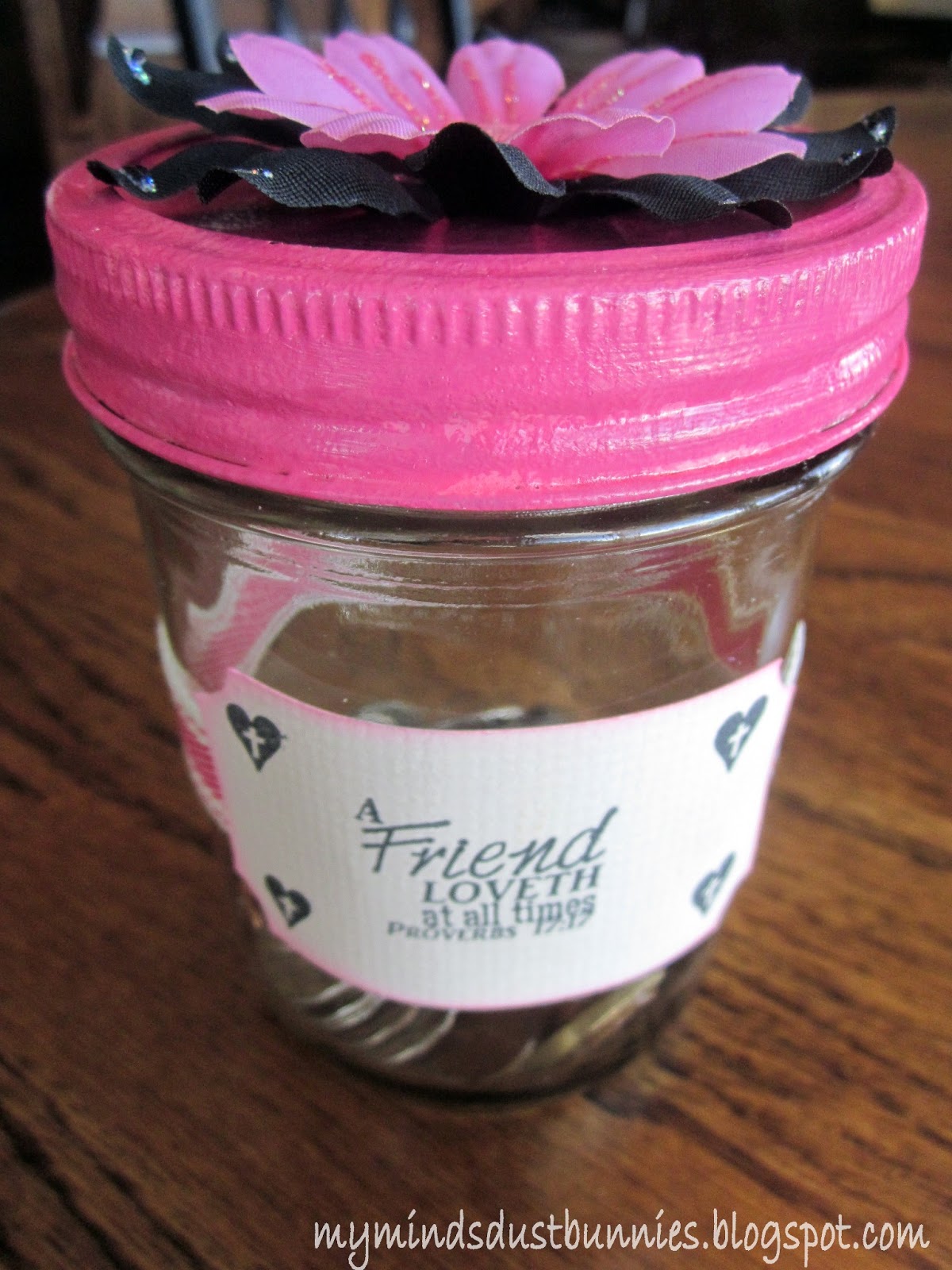
I have a project to share with you that is all about giving. One of the "Bible Babes" (my bible study group of women) came to us and said here is a jar and I think it would be a good idea to put our monies in and once full donate to a charity of choice. We all thought this was a splendid idea.  We meet once a week, but sometimes it is difficult to get us all together to do a service at another time. The jar was a plain jane and another Babe handed it to me and said please make it pretty.

This took no time at all to dress up and it now follows us from house to house:) 


Recipe: 
Label - Elegant Edges
Acrylic Paint
Polyurethane spray
Flowers, Stickles, Button, Ribbon, Worn Lipstick ink
Bible Verse and Cross Heart - K. Andrew Designs

Thanks for stopping by!

Annette


Thursday, January 31, 2013

Exploring Cricut - Shamrock Wreath

I have a fun project to share with you today for Exploring Cricut. I have been wanting to make a burlap wreath for quite some time and hope that you will be inspired to make one too:) Sorry if the picture looks a little dark. I took this on my garage door and the lighting just wasn't cooperating.


The process is very simple. Any craft store should have the items necessary. You will begin by weaving the burlap through the wire holes. As you can see, there are 3 different rims and I chose to weave the burlap through all three. I started with the bottom and worked my way up and back down leaving a loop through each layer. You will also be pushing the burlap together after each loop to alleviate any gaps (the wire rim showing through).  Make sure to keep the loops the same dimension and then at the end you can fluff the loops up.


This is the back of the wreath when finished. The ends were all just tucked inside the wire.


I started with about 6-8" burlap tail and once finished I just weaved that through the back so that it would not hang down. I have about 5 to 6 yards left over of the burlap when I completed the wreath. It is surprisingly sturdy and the burlap doesn't really have room to move around.

To create the shamrocks, I laid them out on my Gypsy to select the sizes that I wanted. The foam that I used had adhesive on the back, which allowed me to layer the shamrocks together to give them more height on the wreath.

I used the deep cut blade to cut the foam with the speed being 3, pressure 4, multi cut 2 and blade depth 5. I also placed the foam on the mat right side down because the rollers will leave an indention. So, when using the Gypsy you will need to flip your image so that the roller marks will not be there and your cut will come out correctly.


After adhering the shamrocks together I decided that this wreath would be great for lots of different uses and I wanted the embellishments to be able to come off easily. I cut the stems down and then wrapped the heavy twine around the flowers. I hot glued them together to give more stability. The shamrocks were hot glued onto the flowers and each other. I then took the heavy twine and tied the embellishment to the wreath so that when I am ready to change the look I just snip the twine and save the look for the next time. I did tie the twine through the rim of the wreath in 3 different places. This is very sturdy and hopefully will withstand the elements of outside.

I will warn you that I have heard that burlap doesn't smell so good in the heat. I would suggest, if you have a storm door, to not put this in between the storm and your front door. Rather, if you front porch is covered to just put on the outside of your storm door. Now, of course, this can be easily used inside as well. I think over a mantle would be very pretty as well. Oh, there are so many choices. Maybe, I will need to make more than one of these:)

Recipe:
18" wire wreath
Burlap 2 rolls (10 yards each)
Shamrocks - Paper Doll Dress Up 5.71", 4.53", 2.76"
8 1/2 x 11 foam (2 sheets - 1 glitter and 1 regular; both sticker backs)
3 St. Patrick Flowers
Twine, hot glue

Thanks for stopping by and remember our challenge ends this Saturday:)

Annette

Thursday, December 6, 2012

Exploring Cricut - St. Nicholas Treats

Hello! So glad you came to visit. Today is my day for a project at Exploring Cricut and since it is St. Nicholas Day I hid these in my girls shoes for this morning with some Hershey kisses inside. I really like how small these turned out. Perfect for those gifts like jewelry, candy, etc.


Now, I do not have a pillow box cut. But, with my gypsy I was able to recreate one fairly easily. For the middle of the box I used the Plantin SchoolBook card and hid the stitching marks that were down the side. I then found an edge from Elegant Edges and welded that to one side of the card. I did have to hide the cut out on this piece, but again, very easy with the gypsy. When it came to the edges I welded an 2 ovals on the top and on the bottom. I just centered the oval on the line for the card's top and bottom. 


I used a hole punch to add the brads. I also used Scor-Tape to make sure that the sides stayed closed. To open the box, I just attached a mini glue dot in between the brads for easy access. 


I inked up the hat from Joys of the Season and added their names. I can't wait for them to find their treats!


I hope you enjoyed this and don't forget to link your card up at Exploring Cricut by Saturday.

Recipe:
Pillow Box - Plantin SchoolBook, Elegant Edges 6 1/4 " unfinished, 
3 3/4" length when finished 
Hat - Joys of the Season 1.71"
Papers - K&Company, American Craft
Brads, tea dye ink

Thanks for stopping by!

Annette

Monday, November 19, 2012

Exploring Cricut Monday Challenge

Hello Everyone! Time for the challenge at Exploring Cricut. The challenge this time is to create a card, layout or project with a Thanksgiving theme. You have until Saturday to enter and you must use an image from Cricut:) This is perfect for those last minute items needed for Thursday. 


I decided to create cupcake toppers. These came together super fast and who doesn't love that.  I included the recipe for the Cheesecake Pumpkin Cupcakes because I think these are the best. I have other recipes for these muffins and sometimes they come out too moist. These are more of a cake texture with a delicious filling. Some say they are a knock off from Starbuck's.  They are so yummy.


I hot glued the toothpick to the back of each topper. 

Recipe for Toppers:
Indian - Trick or Treat 
Turkey - Create A Critter
Xmas Red and Cinnamon Stickles

Pumpkin Cream Cheese Muffins
Source Annie's Eats
Makes 24 muffins

For the filling:
8 oz. cream cheese, softened
1 cup powdered sugar

For the muffins:
3 cups all-purpose flour
1 teaspoon ground cinnamon
1 teaspoon ground nutmeg
1 teaspoon ground cloves
1 tablespoon plus 1 teaspoon pumpkin pie spice
1 teaspoon salt
1 teaspoon baking soda
4 large eggs
2 cups sugar
2 cups pumpkin puree (see Note)
1¼ cups vegetable oil

For the topping:
½ cup sugar
5 tablespoons flour
1½ teaspoons ground cinnamon
4 tablespoons cold unsalted butter, cut into pieces

Note: A standard sized can of pumpkin is 15 ounces (just 1 oz. short of 16 oz = 2 cups). I only used one can and they were just fine. You could also freeze the extra if you decided you wanted a full 2 cups.

Instructions:

To prepare the filling, combine the cream cheese and powdered sugar in a medium bowl and mix well until blended and smooth. Transfer the mixture to a piece of plastic wrap and shape into a log about 1½-inches in diameter. Smooth the plastic wrap tightly around the log, and reinforce with a piece of foil. Transfer to the freezer and chill until at least slightly firm, at least 2 hours. The mixture will still be somewhat soft but firmer.

To make the muffins, preheat the oven to 350˚ F. Line muffin pans with paper liners. In a medium bowl, combine the flour, cinnamon, nutmeg, cloves, pumpkin pie spice, salt and baking soda; whisk to blend. In the bowl of an electric mixer combine the eggs, sugar, pumpkin puree and oil. Mix on medium-low speed until blended. With the mixer on low speed, add in the dry ingredients, mixing just until incorporated.

To make the topping combine the sugar, flour and cinnamon in a small bowl; whisk to blend. Add in the butter pieces and cut into the dry ingredients with a pastry blender or two forks until the mixture is coarse and crumbly. When done it should look like the texture of wet sand. Transfer to the refrigerator to chill until ready to use.

To assemble the muffins, fill each muffin well with a small amount of batter, just enough to cover the bottom of the liner (1-2 tablespoons). Slice the log of cream cheese filling into 24 equal pieces. Place a slice of the cream cheese mixture into each muffin well. You want to put the cream cheese lower than you think because it will rise a lot during the baking process. Divide the remaining batter among the muffin cups, placing on top of the cream cheese to cover completely. Sprinkle a small amount of the topping mixture over each of the muffin wells.

Bake for 20-25 minutes. Transfer to a wire rack and let cool. These are so good warm, cold or room temperature.


Thanks for stopping by and remember you have until Saturday to join in the challenge!
Annette


Thursday, October 25, 2012

Exploring Cricut - Pumpkin Project

Hello! How is everyone? I'm happy to share a project at Exploring Cricut today. I also had a helper with this one, my youngest daughter. This was super easy to create and I hope you like it:)


We started with a small pumpkin and used contact paper to add stars and moons all over the pumpkin. If you are using a real pumpkin, I would suggest wiping down with water in case there might be some dirt left. 


We used the "kiss cut" method when cutting the stars and moons (3 pressure, 3 speed and 3 blade). Once the images were placed she then began to paint the pumpkin black with acrylic paint. This only needed one coat. 


Almost finished. This takes barely any time to dry. The next step was to add Mod Podge. I had a glossy finish, but any will do. While the Mod Podge was drying fine glitter was added to the pumpkin just by sprinkling on.


I did let my Mod Podge dry for awhile before I added the bows and gems.


Thanks for visiting today and don't forget that you still have time to enter our challenge at Exploring Cricut.

Annette

Tuesday, October 16, 2012

Do I Smell Candy?

Hi! Thanks for coming for a visit. I just want to say how much I appreciate the blogging community and how we share and invite others to do the same. We crafters really are a very welcoming crowd and I am proud to be a part of it:)

So, on to my project. I have been playing with the Trick or Treat cartridge and it is so fun! I created a treat bag from Plantin and I have to say this is one of my favorites for a couple reasons. The first one is that it is really roomy. I used my Gypsy to create, but Fit to Page would be good as well. A lot of times when I create the bags from cartridges they are pretty tiny. Maybe it's me, but this one just has a lot more goodies you can fit into it:) The 2nd reason is that I like the circular shape. It is a bit tricky to put together, but patience and good glue gets the job done. I would suggest using Scor-Tape when you are putting bags together.


Recipe:
Circular Bag - Plantin SchoolBook 12.88" or Fit to Page
Bumblebee - Trick or Treat 3.5"
Pumpkin Treat Bag - 1.5"
Word Bubble - Create a Critter 1.24"
Sentiment - The Cat's Pajamas
Chalk, Stickles

Entering:
Paper Playtime Boo-ville
Ink It Pink Challenge #15
Shopping Our Stash Trick or Treat

Thanks for stopping by and have a wonderful day!

Annette


Friday, October 12, 2012

Monster Mash Blog Hop!!

Welcome to the Monster Mash Blog Hop, brought to you by the design teams of Made Especially For You and Exploring Cricut!

Today the design teams of Made Especially For You and Exploring Cricut have teamed up to share with you all sorts of spooktacular monster-themed projects to help get your crafty gears turning for all those upcoming Halloween projects!

If you've come from Kim's blog littleredshood.blogspot.com, you're in the right place! If you just came across the hop and would like to start at the beginning, please visit Ashley at Made Especially For You

For my project, I created a Halloween banner.  This was really fun to do and so simple. I created the banner pennants by using a  large cereal box. I was able to get all 3 cut out of one box.


I Mod Podged the pattern papers to the cardboard base and then began by decorating:) I inked all the edges in black. 


The spider was a stamp that I cut out and then attached by using silver floss. I put Glossy Accent all over the spider.


Dracula needed some red eyes so, of course, I used Stickles.


I added Liquid Pearls to Mr. Bones for his eyes.

Recipe:
Pennants - Create A Critter 11.73"
Eek - Happy Hauntings 3.12"
Frankenstein - Happy Hauntings 3.14"
Dracula - Happy Hauntings 3.14"
Mr. Bones - Happy Hauntings 3.14"
Glossy Accents, Liquid Pearls, Stickles, gems, black ink

We also have some wonderful sponsors giving away prizes to those who comment on every stop of the hop!
Paper Piecings by Nikki
$15 Gift Certificate


$15 Gift Certificate

$10 Gift Certificate

The winners of the blog candy will be announced on Made Especially For You on Tuesday October 16th. Please make sure to leave your contact information when commenting to be eligible to win!

Your next stop is Michelle's blog mumoftwoblog.blogspot.com.  Here's the complete lineup in case you get lost along the way:


Happy Hopping!

Annette

Wednesday, October 10, 2012

Hope For A Cure!

What a beautiful afternoon we are having here in the Midwest. I hope you are having a sunny day too:) I have another SKdigis to share with you for breast cancer. 


I paper pieced, chalked and used my Copics to complete this sweet girl.The ribbon paper is also created by Sonia at SKdigis. Hope you enjoy!

Entering:
Clearly IStamp Challenge #61
Cut It Up Challenges Think Pink 
3 Girl Jam Anything Goes
SKdigis Save the Hooters

Thanks for stopping by!

Annette


Tuesday, October 9, 2012

Boo!

Hi! Well, I just got back in town from Oklahoma where my daughter was auditioning at Oklahoma University School of Dance. What a pretty campus! I hope to get to some of your blogs today to visit. I feel like I have been out of the loop a little just by a couple of days.


Today, I have a Halloween bookmark to share with you that I made before I left to go out of town. I really like my Nook, but there is something about curling up with a good book. I found this cute image at Tori Beveridge's blog and really like how this came together. I cut the background of the bookmark by hand and just hole punched it for a ribbon. The sentiment is a cute one from Bugbites. I then just used my copics and Stickles to finished it off with some buttons. Super easy!

I'm submitting this over at Nana's My Crafting Channnel

Hope you all have an awesome day:)

Annette

Monday, October 8, 2012

SKdigis - Spooky

Woohoo! Over at SKdigis we are definitely in the Halloween spirit. The challenge this time is to use anyone of Sonia's adorable ghosts creations. I chose to use "Scared Ghost" and created this mirror for some fun Halloween decor.


I went to the dollar store and picked up an 8x10 mirror. I painted it black and while that was drying I measured how big I wanted my ghost to be. I used Microsoft Word and sized it accordingly. I wanted my ghost to be at an angle and not completely cover the mirror. I then cut out the ghost from regular copier paper. I used the negative and laid that onto the mirror. I used painter's tape to adhere the paper to the mirror. 

For the eyes, eyebrows and mouth I cut those all out and used re-positional tape to adhere to the mirror.  

To create the ghost image I sprayed Krylon Frosted Glass (I purchased at Michael's with a coupon) and waited for it to dry. I then removed the tape and paper. I added a bit more texture to the ghost by spraying a little bit of the frosted glass onto a paper towel and dabbing the image. This created more of a mottled look.

The web frame around the image was adhered with a little bit of glue and then a black ribbon was added to the back for hanging.

Recipe:
8x10 Mirror - Dollar Store
Ghost - SKdigis
Web Frame - Happy Hauntings 
Krylon Frosted Glass Spray, Black Acrylic Paint

Entering:
My Crafting Channel  Ghoul Times

Thanks for stopping by and hope to see all of your ghostly creations too!

Annette